Field Notes
What the Proctored CCAT (PCCAT) Is Really Like: My 360° Room Scan, Phone Camera, and Activity Monitor Walkthrough
Updated
Former Senior Software Engineer at AWS · Creator of TestCCAT
I sat a live, remote, proctored CCAT myself. A real one via Crossover, on a Zoom call, with a human watching. I built this site, so I wanted to know exactly what test day feels like rather than guess at it. Here is the whole thing, calmly and concretely, so that when it happens to you nothing comes as a surprise.
How it started
There was no special testing app and no exotic lockdown browser. It was a Zoom call. A proctor joined, introduced themselves, and walked me through the rules before anything timed began. The tone was professional and a little procedural, like checking in for a flight. Most of the friction is front-loaded. The setup and the checks take longer than you expect, and the test itself is the short part at the end.
The setup they required
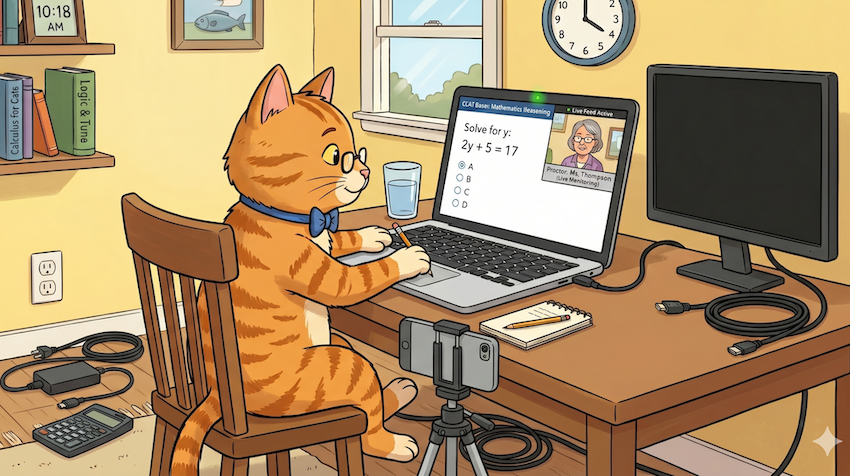
Before we went anywhere near questions, the proctor had me get my environment into a very specific state. None of it was a surprise once I understood the goal. They want to see me, my hands, and my whole workspace, with nothing else running that could feed me answers.
- Laptop webcam on, with my face and hands in frame.
- No second monitor allowed.
- Remove laptop attachments and peripherals (I unplugged the extras they asked about) and verified via phone camera, also on Zoom call.
- A clean desk, clear of notes, papers, and anything I might reference. I had to show each piece of blank paper I was going to use during the exam.
The 360° room scan
Next came the room scan. The proctor asked me to slowly pan my camera around the entire room so they could see the whole space. Walls, desk surface, the area around me. I did this with both the webcam and my phone, turning gradually so nothing was rushed past. It feels a little strange the first time, like a video walkthrough for a rental, but it is quick and it is only awkward if you fumble it. Doing it slowly and deliberately is what they are looking for.
The second camera on the call
Here is the part most people do not anticipate: a second camera. I positioned my phone off to the side and added it to the Zoom call as another participant, so the proctor had an additional angle. From there they could watch me, my hands, and my desk throughout the entire test, not just the head-on webcam view. The phone sat there the whole time as a quiet second set of eyes.
Practically, this means your phone is committed to the call and pointed at you for the duration. You cannot have it next to you to glance at, and you want it charged or plugged in so it does not die mid-test. I propped mine against a stack so it had a stable, slightly-angled view of the desk.
The Activity Monitor walkthrough
The check I did not see coming was a process review. Before the test began, the proctor had me share my screen and slowly scroll through the list of running processes in macOS Activity Monitor. They read down the list with me, and where something was not needed for the test, they had me close it. Anything that looked like it could assist, like extra apps or background tools, got shut down before we continued.
They had me screen-share and scroll slowly through every running process. Anything unnecessary, I closed before the timer ever started.
This is the strongest argument for tidying up before the call. If you close everything you do not need ahead of time, the walkthrough is a thirty-second formality. If your machine is cluttered with open apps, you spend that time hunting and closing under a proctor's gaze, which is exactly the moment you do not want your nerves spiking.
Then the test
With the room scanned, the second camera live, and the process list cleared, the test began. From that point it is the CCAT you have practiced: fifty questions in fifteen minutes, fast and broad. The two camera angles stayed on the whole time. Honestly, once the timer starts, the cameras recede into the background. The pace demands all of your attention, and you stop thinking about being watched.
What it actually felt like
Calmer than I expected, because the surveillance was all settled before the clock started. The hard part was never the watching; it was the same thing it always is: the speed. The candidates who struggle are the ones still rattled by the setup when the first question appears.
A reader's result
What I'd tell you to prepare
Companies like Crossover and programs like Gauntlet AI are known to run the proctored version of this test, so if you are testing for them, expect the full routine above. For the official requirements, read the full PCCAT guide.
PCCAT prep checklist
- Clean the room and clear the desk before the call starts.
- Charge a second device (your phone). It will be your side camera for the whole test.
- Quit all unnecessary apps beforehand, so the Activity Monitor review is instant.
- Use a single monitor; disconnect any second screen and peripherals other than power.
- Practice the pace until it is automatic, so nerves do not blow up your timing.
The throughline of everything above is that the cameras and the room scan are not the real challenge. Get the logistics handled in advance and the proctored layer becomes background noise. Then the only thing left to be good at is the test itself.
Make test day boring
The best PCCAT prep is being so used to the pace that the cameras fade into the background. Practice timed now.
More from the blog
Are You an NPC? I Built a 72-Second Brain Game to Settle It
Four questions, a hard 18-second clock, and a ghost replaying someone's exact answer times against you. The Cognitive Gauntlet is TestCCAT's free 72-second brain game, and it will judge you.
TestCCAT vs. JobTestPrep, 12minprep, and Official CCAT Prep: Which Should You Use?
A practical comparison of TestCCAT, JobTestPrep, 12minprep, and official Criteria CCAT prep resources, and when each option makes sense.
Why TestCCAT Makes You Retake Missed Questions on 3 Different Days
Full exams diagnose your weak spots. Tutor insights tell you what to drill. Mistakes review brings missed questions back until you answer them correctly across 3 separate days.
© 2026 TestCCAT · Last updated July 2026